Showing posts with label mobile applications. Show all posts

Tuesday, April 26, 2016

Just Published: MoovieSurf Android App for easily searching for movies

The MoovieSurf Android app allows users to quickly search for movies.


It allows the user to do a "live list" search for a movie within a movies network given a search term such as "the", "man", "furious", etc. or for a specific movie name.
"Live list" search means the list is updated as the user types.

If the search term or movie is found, it displays a list of movie thumbnail images along with the movie title and the year released in a card layout.

If the user selects a movie from the displayed list, then a detailed description of the movie, including the movie cast, critics score, user score, rating and the runtime for the movie is provided. A synopsis or description of the movie is also provided if available.


You can download the FREE MoovieSurf Android app which is available in the Google Play store from http://bit.ly/1WRYcY1.
Try out the MoovieSurf app, rate it and add a review!  Feel free to add any comments :)

View more documents from tasneemsayeed.

Tuesday, May 6, 2014

How to Send Email Within Your iPhone Application

This article provides a tutorial to help you send an email from inside your iPhone application using the iPhone SDK built-in APIs.
The iPhone SDK provides the built-in MessageUI framework, which greatly simplifies the implementation of email functionality within an iOS application.

Creating a Simple Email UI

Create a simple app with a UI View Controller and call it the name, "SimpleEmailAppViewController". Then, add a button to the UIView by dragging it from the interface builder, and rename the button title to "Contact Us".

When the user taps the "Contact Us" button, the app will display the email user interface.

Making Connections to the User Interface

In order to make the connections from the "Contact Us" button to an action, you need to select the SimpleEmailAppViewController.xib file from the Project Navigator then go to the Interface Builder. Switch to the Assistant Editor while hiding the Utility area. Once this is done, the interface and its corresponding code are displayed side by side. Next, press and hold the key and click the "Contact Us" button and
drag it towards the "SimpleEmailAppViewController.h. As you place the pointer just below @interface and before the @end, and as you release the mouse button, you will notice a prompt that allows you to insert an outlet and action.
Select "Action" for "Connection" and enter "sendEmail" for "name" as shown below.

The event can be kept as "Touch Up Inside". When the user clicks the "Contact Us" button and lifts up the finger inside the button, it will result in invoking the "sendEmail" method.  Once, you click Connect to confirm the changes, Xcode automatically adds the method declaration into "SimpleEmailAppViewController.h" file.

Implementing the Email Interface

In "SimpleEmailAppViewController.h", implement the "MFMailComposeViewControllerDelegate" as shown below.

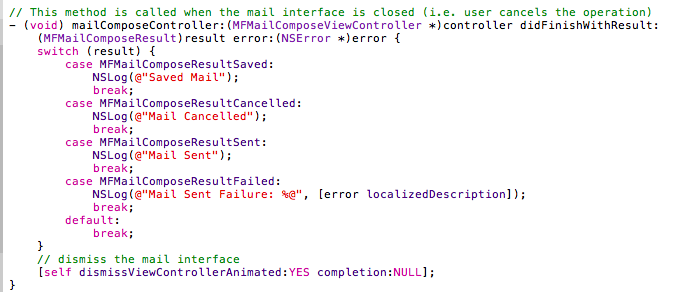
In "SimpleEmailAppViewController.m", implement the "sendEmail" method. Also, add the implementation for the delegate method, "MFMailComposeViewControllerDelegate".  Note that we will also be utilizing the built-in API from the iOS SDK called "MFMailComposeViewController".
The "MFMailComposeViewController" class provides a standard interface to allow the editing, and composing of an email message. You can use this view controller to display a standard email view within your iOS application. We populate the fields of this view with initial values including the recipient email, subject and body of the message.

This view controller class also includes the following delegate method:
(void) mailComposeController:(MFMailComposeViewController *)controller 
  didFinishWithResult:(MFMailComposeResult)result error:(NSError *)error

This method is invoked when the user cancels the operation and the mail composition interface is dismissed. The result parameter tells you the result code when the mail composition interface is dismissed. In a real-world application, the app should display any errors that may occur if the app fails to send the email message.
Linking with the Message UI Framework

If you try to build the application, you will notice that you will get build errors. The "MFMailComposeViewController" class is built-in within the MessageUI framework. 
To fix the compilation problem(s), you will need to add the MessageUI framework so that it is linked properly with your application.  In the Project Navigator, select the "SimpleEmailApp" project and then select "SimpleEmailApp" target under Targets.  Then, click "Build Phases" at the top of the project editor panel. Then, click on "Link Binary With Libraries" section. 


Next, click the "+" button and select the "MessageUI framework". After you click the "Add" button, Xcode will include the MessageUI framework. This should fix your error(s), and you can now run your application.  When you tap on the "Contact Us" button, it will display the email composition window with the pre-populated email content.

If you find this tutorial helpful, and would like to see more of these types of tutorials, then share a comment!  Or if you have any other suggestions, do let me know as well.  And follow me on twitter (@tasneemsayeed).
View more documents from tasneemsayeed.

Friday, March 8, 2013

Implementing Singletons for the iOS platform

The Singleton design pattern is one of the most frequently used design pattern when developing for the iOS platform. It is a very powerful way to share data across different parts of an iOS application without having to explicitly pass the data around manually.

Overview

Singleton classes play an important role in iOS as they exhibit an extremely useful design pattern.  Within the iOS SDK, the UIApplication class has a method called sharedApplication which when called from anywhere will return the UIApplication instance that is associated with the currently running application.

How to implement the Singleton Class

You can implement the Singleton class in Objective-C as follows:

 MyManager.h


@interface MySingletonManager : NSObject {
    NSString *someProperty;
}


@property (nonatomic, retain) NSString *someProperty;

+ (id)sharedManager;

@end

MyManager.m

#import "MySingletonManager.h"

@implementation MySingletonManager

@synthesize someProperty;

#pragma mark Singleton Methods

+(id) sharedManager {
    static MySingletonManager *sharedMySingletonManager = nil;
    static dispatch_once_t onceToken;
    dispatch_once(&onceToken, ^{
        sharedMySingletonManager = [[self alloc] init];

    });
    return sharedMySingletonManager;
}
                  
- (id)init {
    if (self = [super init]) {
        someProperty = @"Default Property";
    }
    return self;
}

- (void)dealloc {
    // should never be called, but included here for clarity
}

@end

The above code fragment defines a static variable called sharedMySingletonManager which is then initialized once and only once in sharedManager.  The way that we ensure that it is only created once is by using the dispatch_once method from the Grand Central Dispatch (GCD).  This is thread safe and handled entirely by the OS so you do not need to worry about it at all.

If you rather not use GCD, then you can the following code fragment for sharedManager:

Non-GCD Based 

+ (id)sharedManager {
    @synchronized(self) {
        if (sharedMySingletonManager == nil)
            sharedMySingletonManager = [[self alloc] init];
    }
    return sharedMySingletonManager;
} 
 
Then, you can reference the Singleton from anywhere by calling the function below:

Referencing the Singleton

MySingletonManager *sharedManager = [MySingletonManager sharedManager];
Happy Singleton'ing!   If you find this post useful, then mention me in the comments.

View more documents from tasneemsayeed.

Monday, November 7, 2011

Driving Mobile Application Downloads

With iTunes now carrying 225,000 apps in its "curated" collection and Android up to 100,000, it is no wonder that app discovery is a major issue for application developers.  

Undoubtedly, one of the key decisions in launching a successful mobile application is determining how to drive application downloads.

Based on experience launching applications working in several mobile startups, I believe that there are at least six key mobile strategies to consider for driving adoption:

  1. Why is mobile media support needed? 
    • Mobile media support is needed since we need to reach consumers who may already have a mindset or may already be used to certain types of applications (i.e. facebook, twitter, etc). There may also be a need to educate users on issues such as privacy, security,  and so on.
  2. What should be the average marketing spend?
    • As a result of analyzing download trends and media spend across various advertisers, several marketing experts have determined that the minimum mobile media spend is $200,000 over two days to truly make an impact and accelerate measurable downloads.
  3. When should you begin mobile media support? 
    • The day of week apparently matters.  To leverage typical download activity, it is suggested to launch your application and begin supporting it toward the end of the week - on a Thursday or Friday. This is allow you to build on the momentum of the weekend downloads.
  4. How robust should the mobile application be?
    • It is critical to make your application robust because "first impression" matters. If an application frequently crashes or if critical functionality does not work properly, then it is likely that your application may not be subsequently used.  While multiple features such as video, pictures, gaming and maps make for a bigger experience, if consumers cannot download the application and subsequent updates in certain WiFi zones, then it will most likely inhibit downloads.
  5. Which form of advertising is more important: creative or contextual?
    • Based on mobile campaigns with those of digital display, marketing experts have concluded that in mobile media efforts, the banner creative has more of an impact on performance.  However, in online campaigns, contextual is typically more important.
  6. Which mobile devices need to be supported?
    • If you want to maximize coverage, then it is recommended that your application must be cross platform (i.e. must support iOS devices such as iPhone 3, 3GS, 4 and Android devices such as Droid X and/or HTC Evo).  However,  keep in mind that the uber-smartphone market represents less than 20 percent of smartphone penetration.  Therefore, by including all phones that can access the Web, you will not only build scale, but you may also experience higher conversion rates from some of the less sophisticated devices.
Driving application downloads is not the only factor for launching a successful mobile application, but it is certainly an important one.


If you found this article useful, please retweet and/or leave me a comment.